

Introduction
Introduction

Project
Project
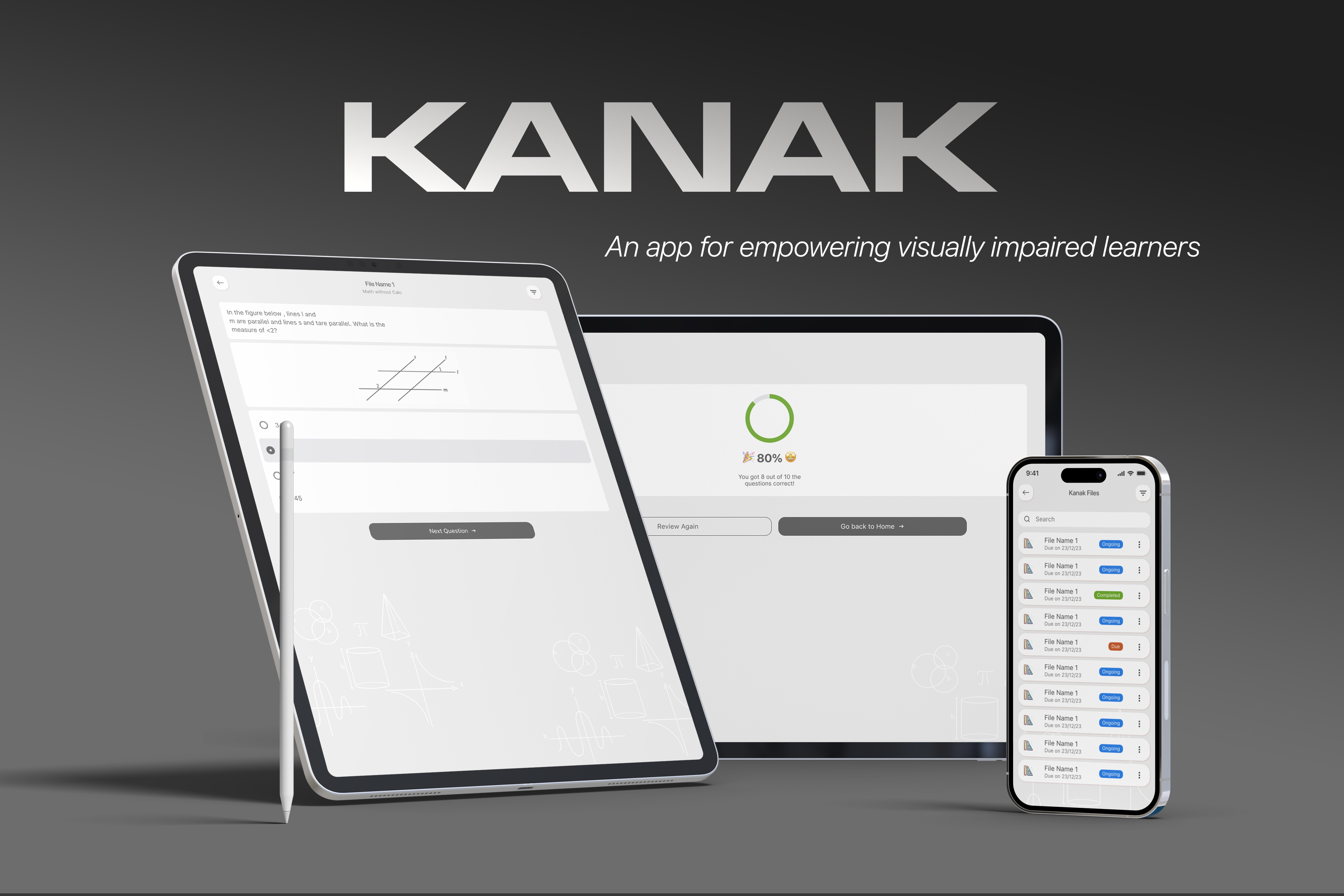
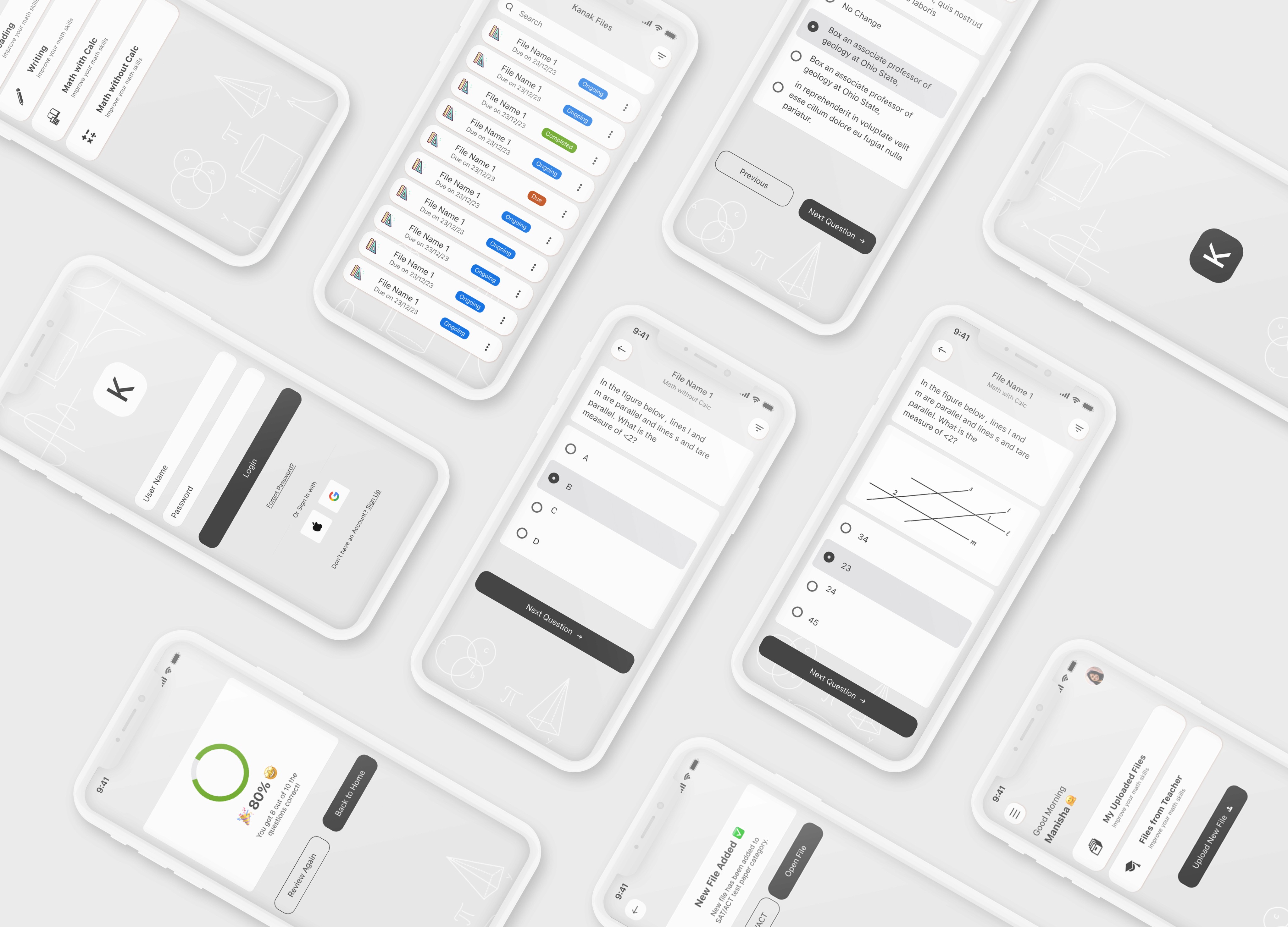
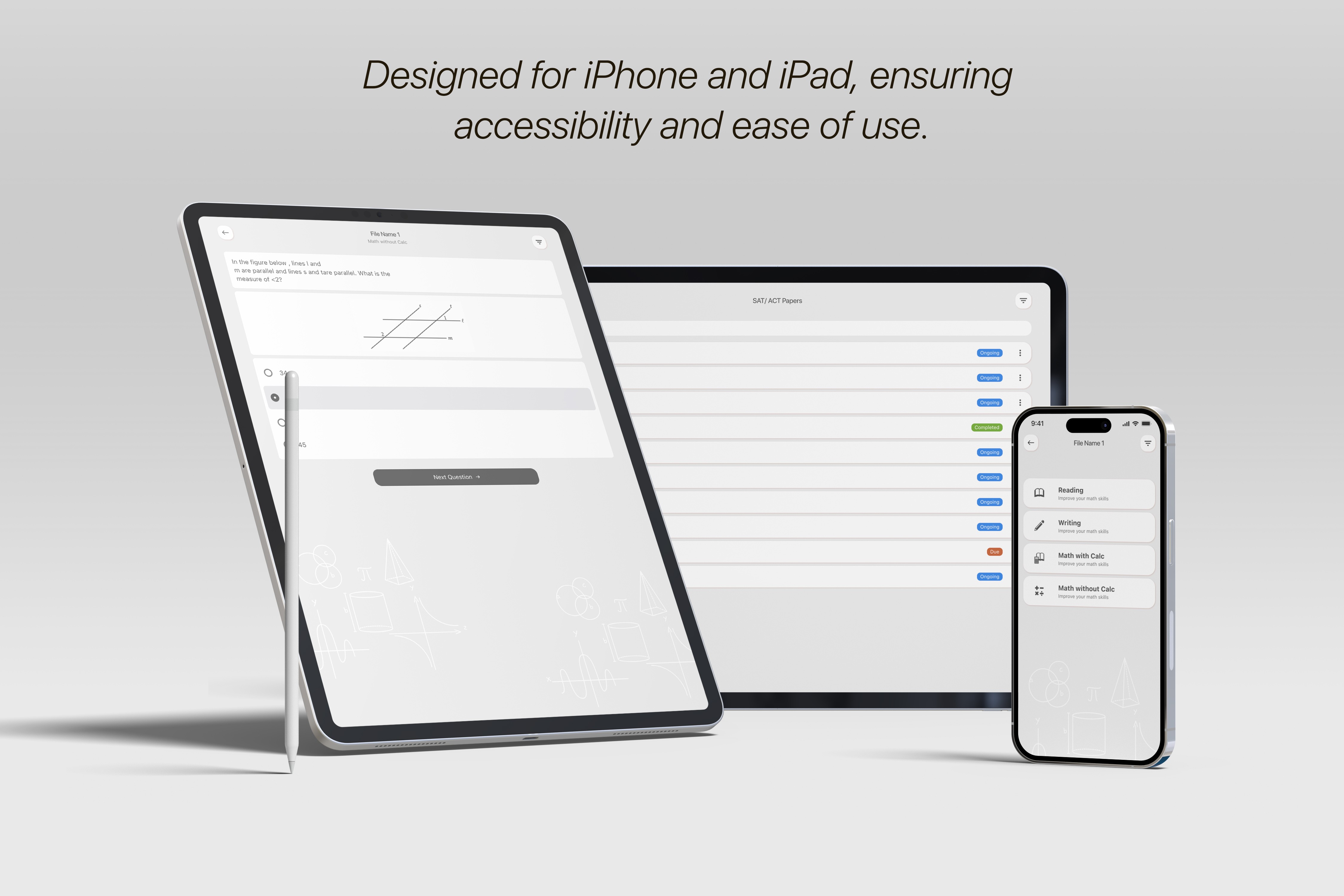
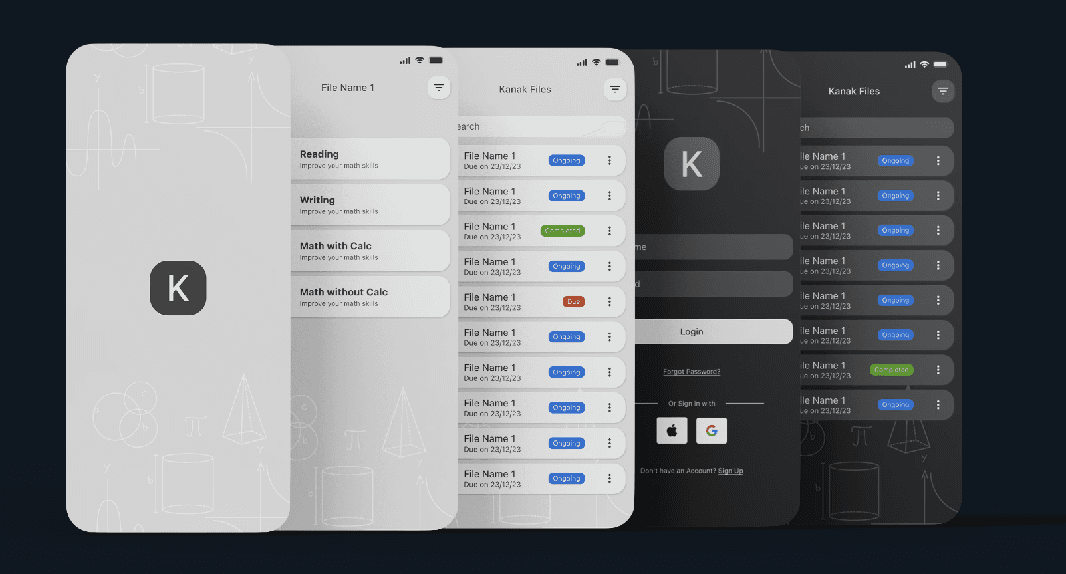
Kanak is a mobile-first iOS platform designed to empower visually impaired students by providing accessible tools to build math skills and prepare for standardized tests like the SAT. Available for both iPhone and iPad, Kanak incorporates audio-first interaction, haptic feedback, customizable fonts, and landscape support for math tasks like drawing and graphing. The app also includes an organized file system, VoiceOver optimization, and support for materials shared by teachers, creating a truly independent and inclusive learning experience.
Kanak is a mobile-first iOS platform designed to empower visually impaired students by providing accessible tools to build math skills and prepare for standardized tests like the SAT. Available for both iPhone and iPad, Kanak incorporates audio-first interaction, haptic feedback, customizable fonts, and landscape support for math tasks like drawing and graphing. The app also includes an organized file system, VoiceOver optimization, and support for materials shared by teachers, creating a truly independent and inclusive learning experience.
Team
Team
Design: Lead Product Designer (my role), 1 additional Designer
Engineering: 2 iOS Developers
Product: 1 Product Owner
Design: Lead Product Designer (my role), 1 additional Designer
Engineering: 2 iOS Developers
Product: 1 Product Owner
Timeline:
Timeline:
3 Months for the MVP
3 Months for the MVP
Tools
Tools
Figma
Figma

Whimsical
Whimsical
Google Analytics
Google Analytics
Research & Discovery
Research & Discovery
Uncovering user needs, goals, and accessibility gaps to drive inclusive innovation.
Uncovering user needs, goals, and accessibility gaps to drive inclusive innovation.
User Interviews
User Interviews
We spoke with visually impaired students, parents, teachers, and accessibility specialists. Users frequently described current educational tools as frustrating, overly visual, and uninspiring. The desire for voice-led interaction, vibrational feedback, and better SAT prep was consistent across users.
We spoke with visually impaired students, parents, teachers, and accessibility specialists. Users frequently described current educational tools as frustrating, overly visual, and uninspiring. The desire for voice-led interaction, vibrational feedback, and better SAT prep was consistent across users.
Key Pain Points Identified
Key Pain Points Identified

Current learning tools are boring and disengaging for visually impaired students
Current learning tools are boring and disengaging for visually impaired students
Lack of interactive or tactile feedback (e.g., haptics or sounds)
Lack of interactive or tactile feedback (e.g., haptics or sounds)
Reading and graphing are especially hard due to visual UI dependency
Reading and graphing are especially hard due to visual UI dependency
SAT practice tools are not designed with accessibility in mind
SAT practice tools are not designed with accessibility in mind
Fonts and layouts are inflexible and inaccessible for low-vision users
Fonts and layouts are inflexible and inaccessible for low-vision users
No way to independently access teacher-shared content or customized files
No way to independently access teacher-shared content or customized files
“Most of the apps we get to use are either too plain or just hard to use. They don’t feel made for us. It’s like they expect us to just settle for boring.
- Visually impaired student
User Personas

Ethan Miller
Ethan Miller
High School Student
High School Student
Ethan is a 16-year-old dedicated high school student who enjoys problem-solving and aspires to study engineering. However, his visual impairment makes it challenging to access traditional math resources. He often struggles with complex problem-solving due to a lack of interactive and adaptive learning tools. Ethan relies on screen readers and voice-guided apps to navigate educational materials
Ethan is a 16-year-old dedicated high school student who enjoys problem-solving and aspires to study engineering. However, his visual impairment makes it challenging to access traditional math resources. He often struggles with complex problem-solving due to a lack of interactive and adaptive learning tools. Ethan relies on screen readers and voice-guided apps to navigate educational materials
Goals
Improve SAT math skills through accessible learning resources.
Gain confidence in solving complex problems independently.
Use an app that provides step-by-step guidance and explanations
Goals
Improve SAT math skills through accessible learning resources.
Gain confidence in solving complex problems independently.
Use an app that provides step-by-step guidance and explanations
Goals
Improve SAT math skills through accessible learning resources.
Gain confidence in solving complex problems independently.
Use an app that provides step-by-step guidance and explanations
Challenges
Difficulty understanding complex math concepts through static text.
Limited availability of interactive, accessible learning tools.
Needs a structured way to track progress and review mistakes
Challenges
Difficulty understanding complex math concepts through static text.
Limited availability of interactive, accessible learning tools.
Needs a structured way to track progress and review mistakes
Sarah Thompson
Sarah Thompson
Special Education Teacher
Special Education Teacher
Sarah has been teaching visually impaired students for over a decade and is passionate about making learning inclusive. At 42 years old, she often struggles to find accessible resources that cater specifically to math education. While general accessibility tools exist, they lack interactive elements and progress tracking features, making it difficult for her to personalize lessons for her students.
Sarah has been teaching visually impaired students for over a decade and is passionate about making learning inclusive. At 42 years old, she often struggles to find accessible resources that cater specifically to math education. While general accessibility tools exist, they lack interactive elements and progress tracking features, making it difficult for her to personalize lessons for her students.

Goals
Find an effective tool to teach math in an accessible way.
Monitor student progress with clear, detailed reports.
Encourage student independence and confidence in learning.
Goals
Find an effective tool to teach math in an accessible way.
Monitor student progress with clear, detailed reports.
Encourage student independence and confidence in learning.
Goals
Find an effective tool to teach math in an accessible way.
Monitor student progress with clear, detailed reports.
Encourage student independence and confidence in learning.
Challenges
Most existing tools are not tailored for visually impaired students.
Difficulty tracking individual student progress efficiently.
Needs an intuitive platform that is easy for both students and educators.
Challenges
Most existing tools are not tailored for visually impaired students.
Difficulty tracking individual student progress efficiently.
Needs an intuitive platform that is easy for both students and educators.

Maria Rodriguez
Maria Rodriguez
Working Mother
Working Mother
Maria’s 14-year-old son, Leo, is preparing for his SATs and struggles with math due to his visual impairment. At 38 years old, she is a working mother with limited time to assist him daily but wants to ensure he has the best resources available. She is looking for an intuitive and engaging app that allows Leo to learn at his own pace while providing her with insights into his progress.
Maria’s 14-year-old son, Leo, is preparing for his SATs and struggles with math due to his visual impairment. At 38 years old, she is a working mother with limited time to assist him daily but wants to ensure he has the best resources available. She is looking for an intuitive and engaging app that allows Leo to learn at his own pace while providing her with insights into his progress.
Goals
Support her child’s SAT preparation in an efficient way.
Monitor progress through a simple and accessible platform.
Ensure her child stays motivated and confident.
Goals
Support her child’s SAT preparation in an efficient way.
Monitor progress through a simple and accessible platform.
Ensure her child stays motivated and confident.
Goals
Support her child’s SAT preparation in an efficient way.
Monitor progress through a simple and accessible platform.
Ensure her child stays motivated and confident.
Challenges
Limited time to assist with daily learning.
Difficulty finding accessible and engaging educational tools.
Needs a system that provides clear feedback and structured learning.
Challenges
Limited time to assist with daily learning.
Difficulty finding accessible and engaging educational tools.
Needs a system that provides clear feedback and structured learning.
User Persona
Touchpoint Analysis
Touchpoint Analysis
Before designing Kanak, we conducted a touchpoint analysis to understand the real-world learning journey of visually impaired students. This helped us identify gaps, emotional highs and lows, and opportunities where assistive technology could truly make an impact.
Before designing Kanak, we conducted a touchpoint analysis to understand the real-world learning journey of visually impaired students. This helped us identify gaps, emotional highs and lows, and opportunities where assistive technology could truly make an impact.
Tools Used:
Tools Used:
Miro, Whimsical, Apple’s Human Interface Guidelines for Accessibility, iOS device testing (iPad/iPhone)
Miro, Whimsical, Apple’s Human Interface Guidelines for Accessibility, iOS device testing (iPad/iPhone)
1.
Students access files in multiple ways: emailed PDFs, teacher handouts, audio notes, or Braille - centralizing files was essential
Students access files in multiple ways: emailed PDFs, teacher handouts, audio notes, or Braille - centralizing files was essential
2.
Many rely on VoiceOver, but it becomes overwhelming without structured flows
Many rely on VoiceOver, but it becomes overwhelming without structured flows
3.
For subjects like math and SAT prep, landscape mode and tactile feedback would be critical (e.g., for graphs or multi-step problems)
For subjects like math and SAT prep, landscape mode and tactile feedback would be critical (e.g., for graphs or multi-step problems)
4.
Students often had to rely on others to upload or organize content - this sparked the need for a student-led file manager and upload flow
Students often had to rely on others to upload or organize content - this sparked the need for a student-led file manager and upload flow
5.
After practice tests, students often received no immediate feedback, leading to disengagement - real-time, verbal scoring and motivation became a must-have
After practice tests, students often received no immediate feedback, leading to disengagement - real-time, verbal scoring and motivation became a must-have
This analysis informed not just features, but the tone, layout, and structure of Kanak - resulting in an experience designed around real educational moments, not just user interface components.
This analysis informed not just features, but the tone, layout, and structure of Kanak - resulting in an experience designed around real educational moments, not just user interface components.
Competitive Analysis
Competitive Analysis
We reviewed a range of tools commonly used by visually impaired students and educators, including Seeing AI, Microsoft Math Solver, and Khan Academy. While each serves an important role, they lack a unified approach to structured academic learning and accessibility.
We reviewed a range of tools commonly used by visually impaired students and educators, including Seeing AI, Microsoft Math Solver, and Khan Academy. While each serves an important role, they lack a unified approach to structured academic learning and accessibility.
While tools like Seeing AI and Microsoft Math Solver serve important roles, they are not designed for structured, curriculum-aligned learning or standardized test prep. Kanak was built from the ground up to address this gap - blending accessibility, academic focus, and tactile interaction in a single platform.
This analysis confirmed the need for a fully accessible, learning + test-prep hybrid solution—one that supports not just information access, but true independent skill-building for visually impaired learners.
While tools like Seeing AI and Microsoft Math Solver serve important roles, they are not designed for structured, curriculum-aligned learning or standardized test prep. Kanak was built from the ground up to address this gap - blending accessibility, academic focus, and tactile interaction in a single platform.
This analysis confirmed the need for a fully accessible, learning + test-prep hybrid solution—one that supports not just information access, but true independent skill-building for visually impaired learners.
Ideation and Concept Development
Ideation and Concept Development
Problem Statement
Problem Statement
Visually impaired students lack a single, unified platform that allows them to independently learn math, prepare for standardized exams, and receive audio-tactile feedback tailored to their abilities.
Visually impaired students lack a single, unified platform that allows them to independently learn math, prepare for standardized exams, and receive audio-tactile feedback tailored to their abilities.

Objective
Objective

To design a fully accessible, iOS-native platform that empowers visually impaired students to independently learn math, prepare for the SAT, and engage with academic content through voice-first navigation, haptic feedback, customizable fonts, and landscape-optimized interactions.
To design a fully accessible, iOS-native platform that empowers visually impaired students to independently learn math, prepare for the SAT, and engage with academic content through voice-first navigation, haptic feedback, customizable fonts, and landscape-optimized interactions.
Feature Ideation
Feature Ideation
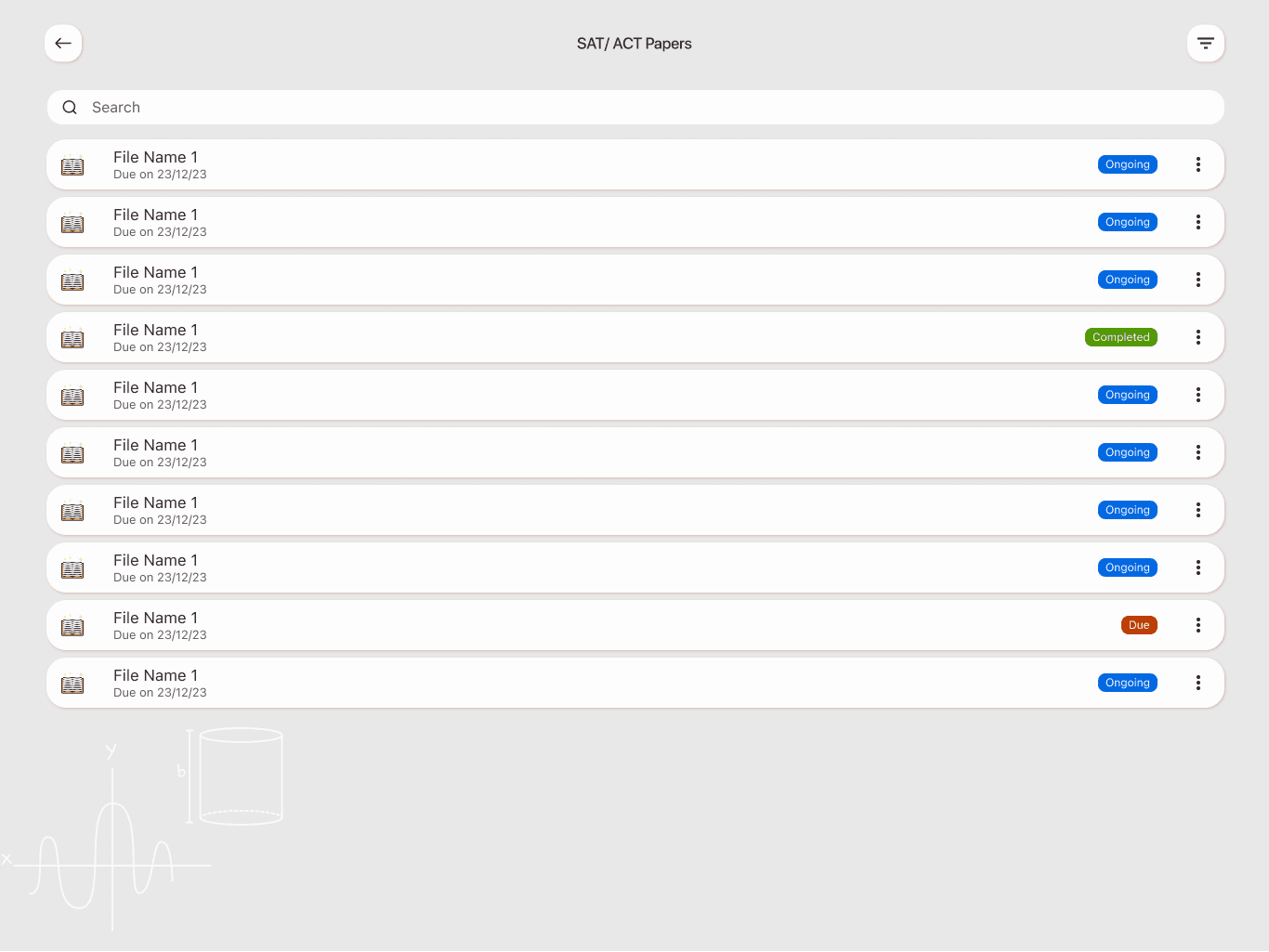
File categories: personal, teacher-provided, Kanak worksheets, SAT/ACT papers
File categories: personal, teacher-provided, Kanak worksheets, SAT/ACT papers
Accessibility modes: with/without VoiceOver
Accessibility modes: with/without VoiceOver
SAT Section Selector (Reading, Writing, Math with/without calculator)
SAT Section Selector (Reading, Writing, Math with/without calculator)
Voice-guided navigation and score feedback
Voice-guided navigation and score feedback
Math reader and audio + touch graph support
Math reader and audio + touch graph support
Progress tracking, profile customization, and account settings
Progress tracking, profile customization, and account settings
Concept Exploration
Concept Exploration
We explored scenarios where students:
We explored scenarios where students:
Upload their own files
Upload their own files
View and complete SAT tests with only audio and vibration cues
View and complete SAT tests with only audio and vibration cues
Switch to landscape mode for graph interaction on iPad
Switch to landscape mode for graph interaction on iPad
Receive haptic confirmation of correct actions
Receive haptic confirmation of correct actions
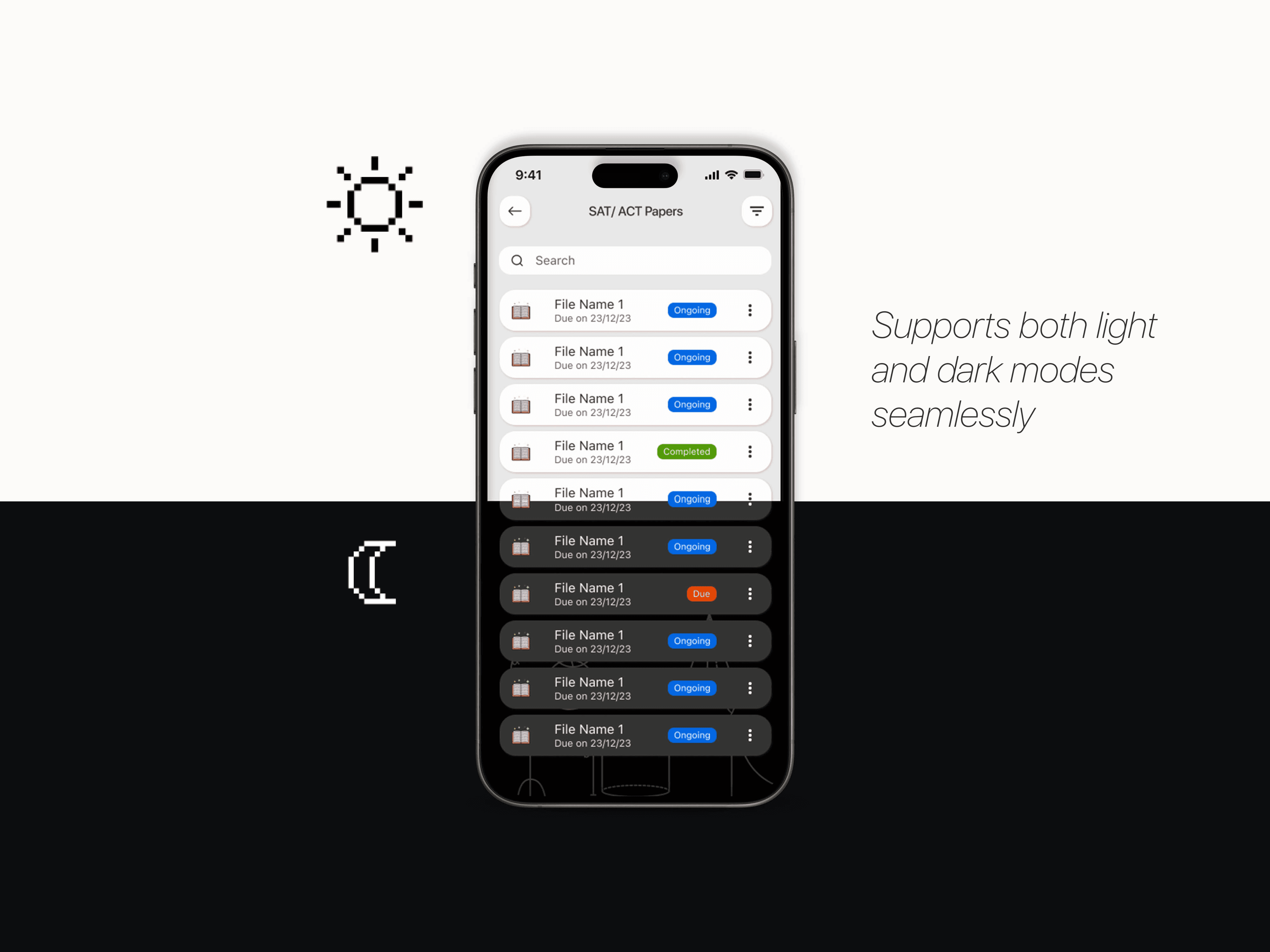
Adjust font sizes and layouts for better visibility
Adjust font sizes and layouts for better visibility
Wireframing and Structure
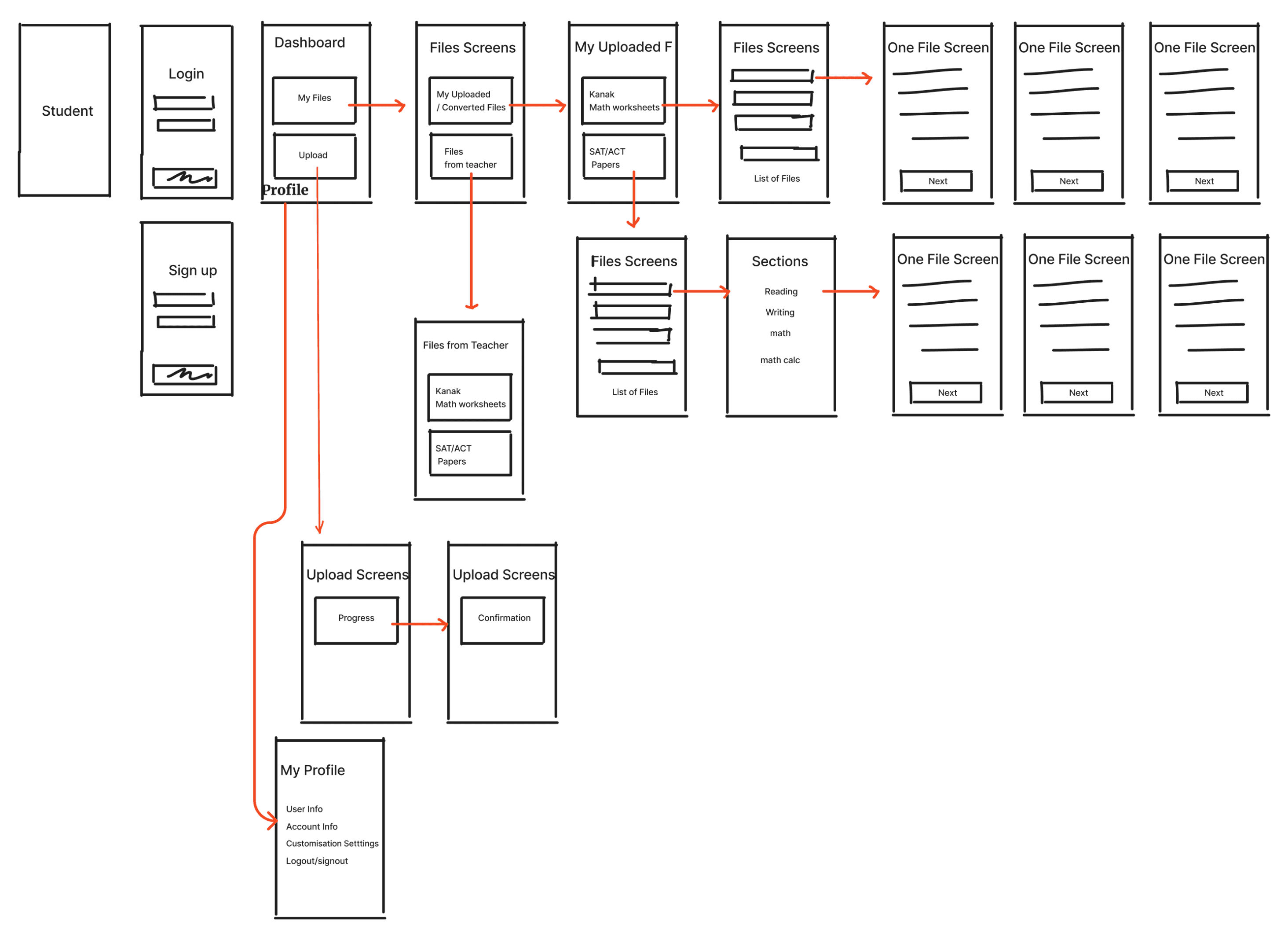
Information Architecture
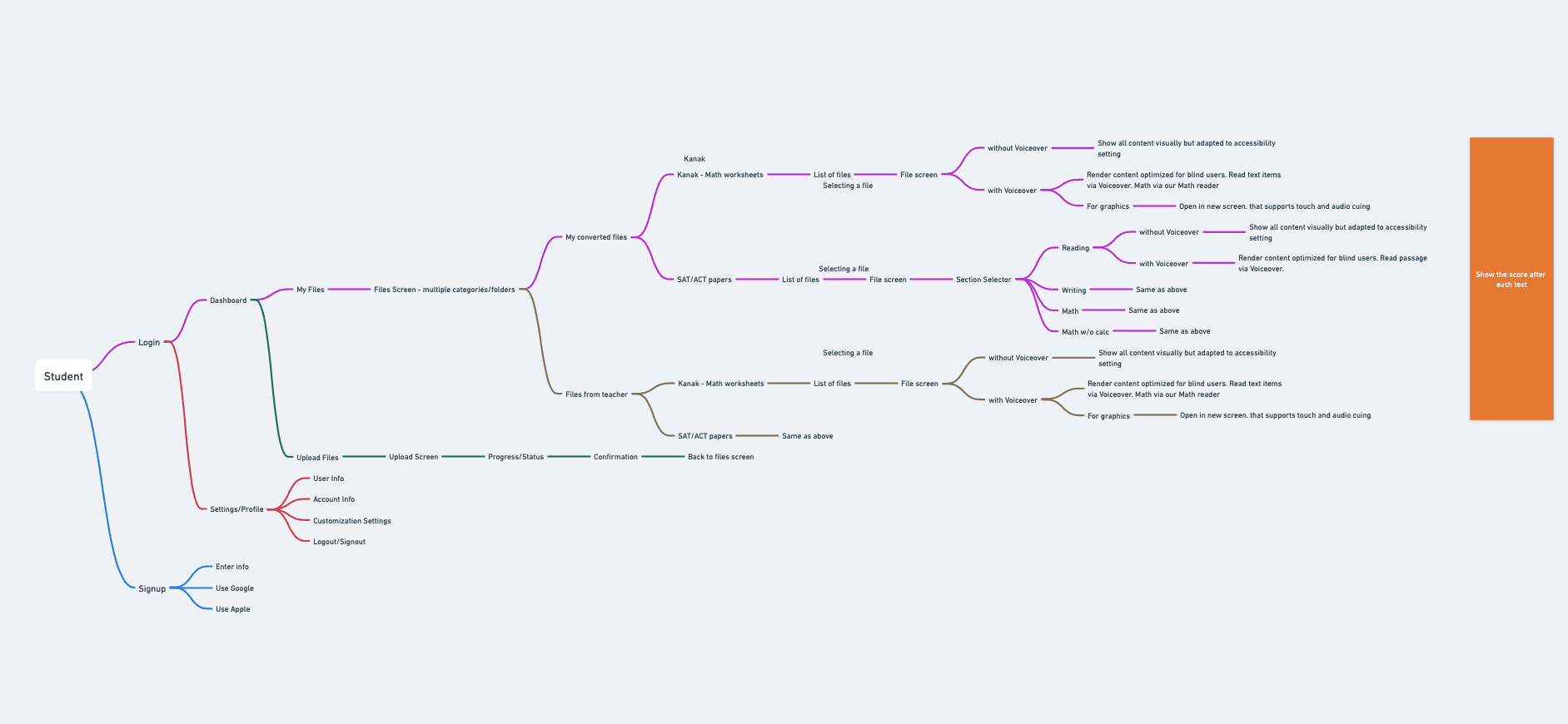
Designing a simple and accessible user journey, guided by the IA
The IA includes:
1.
User Entry (Signup via Apple/Google or manually)
2.
Dashboard with access to:
My Files
Upload Flow
Settings/Profile
3.
My Files contains:
Kanak Worksheets
SAT/ACT Practice
Files from Teacher
4.
File Viewing Modes:
With VoiceOver (optimized for screen readers)
Without VoiceOver (visual display adapted to accessibility settings)
Graphics open in special screen for touch + audio cueing
5.
SAT Section Selector for Reading, Writing, Math
6.
Upload Flow to manage student-created files
7.
Settings/Profile for font, account, and logout controls
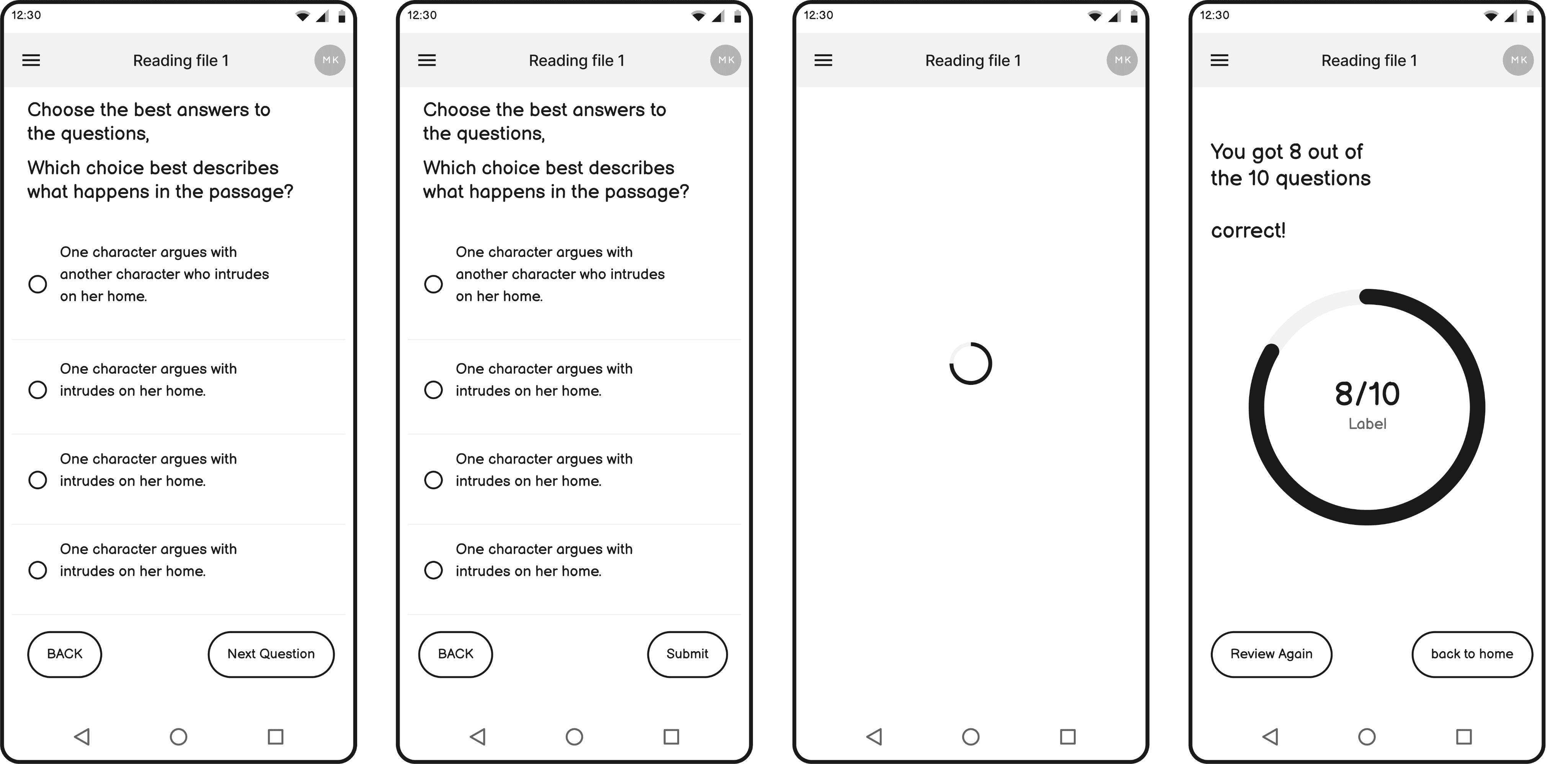
Low-fidelity Wireframes
Low-fidelity Wireframes
High-fidelity Wireframes
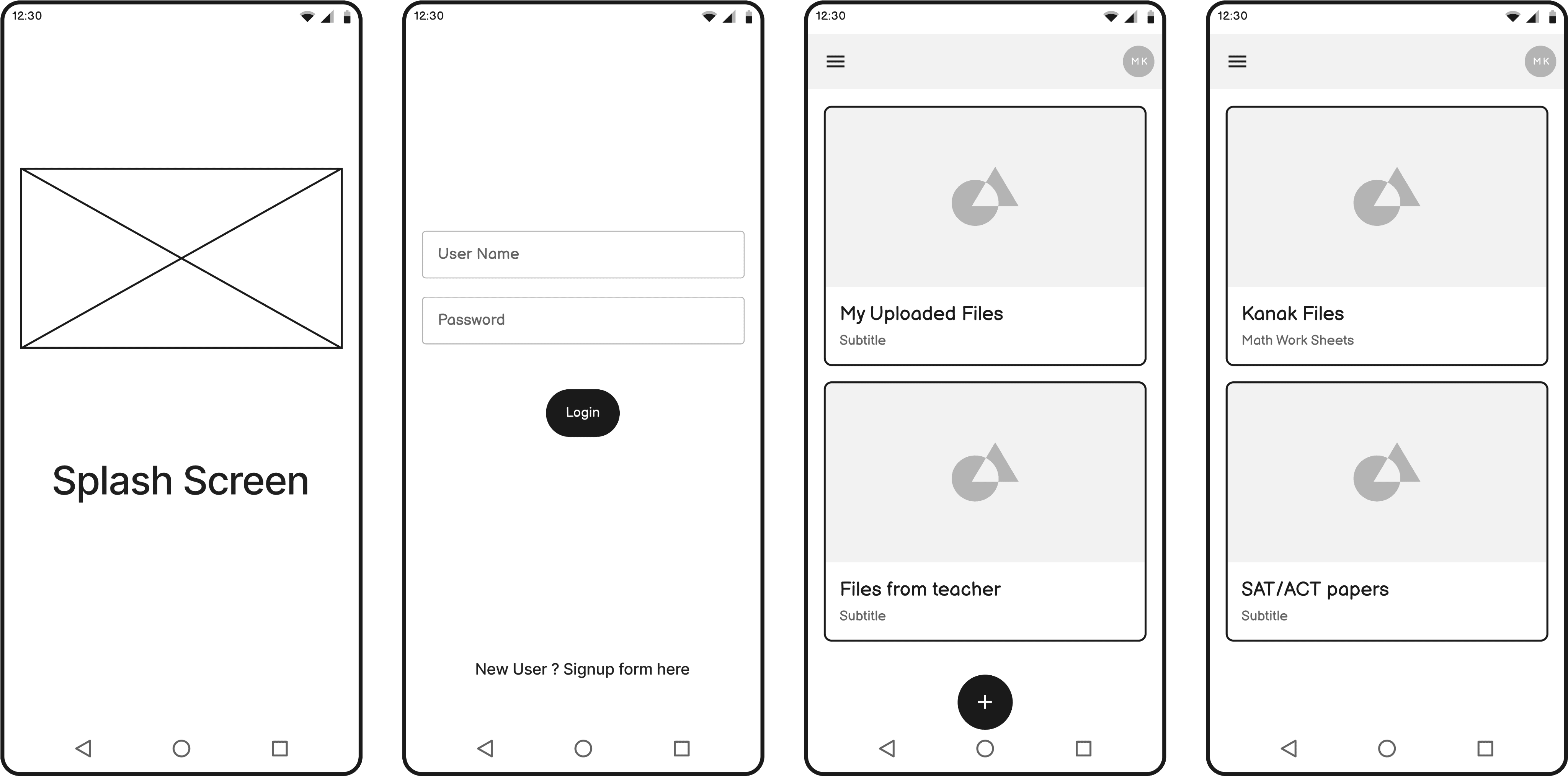
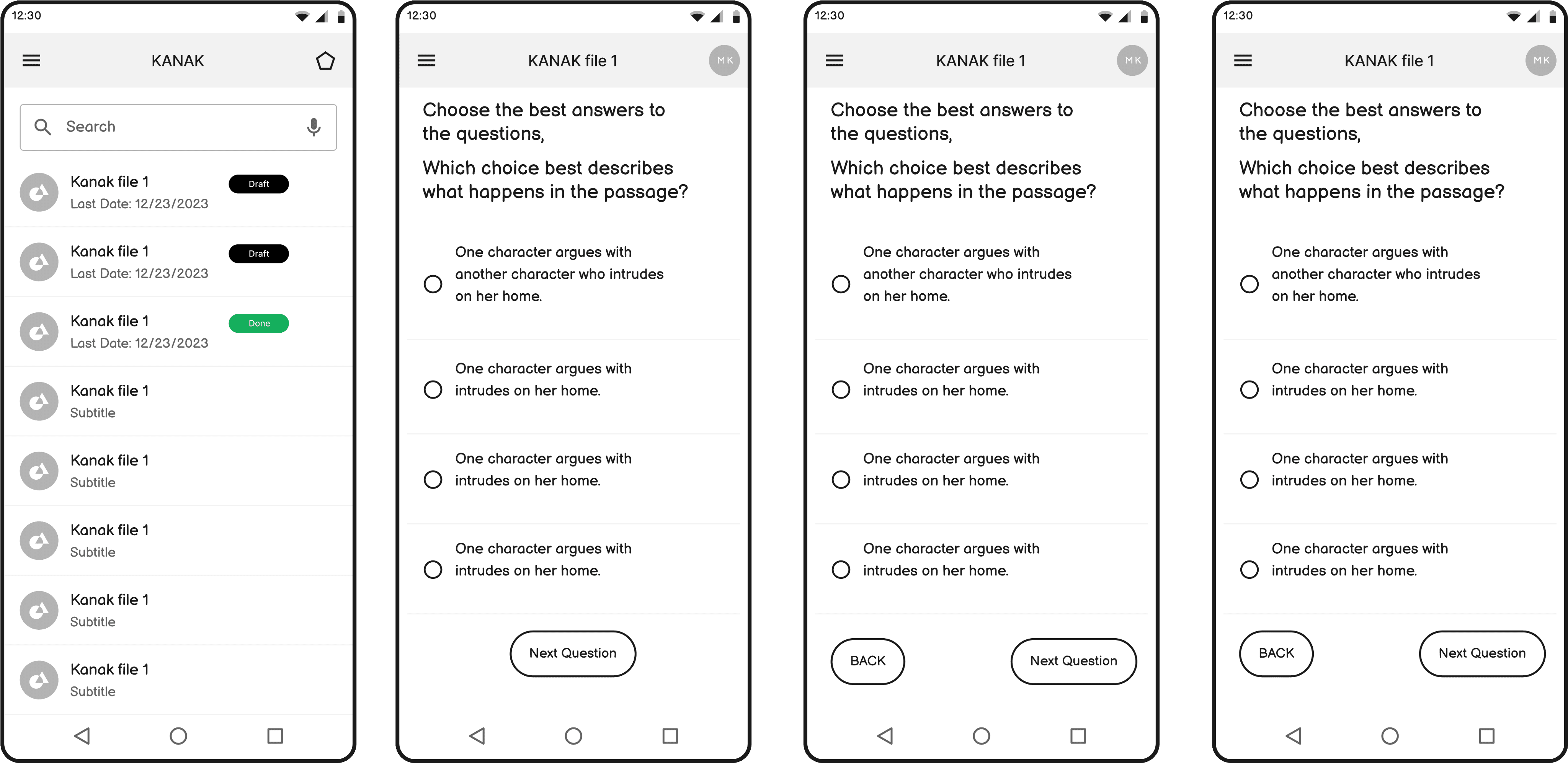
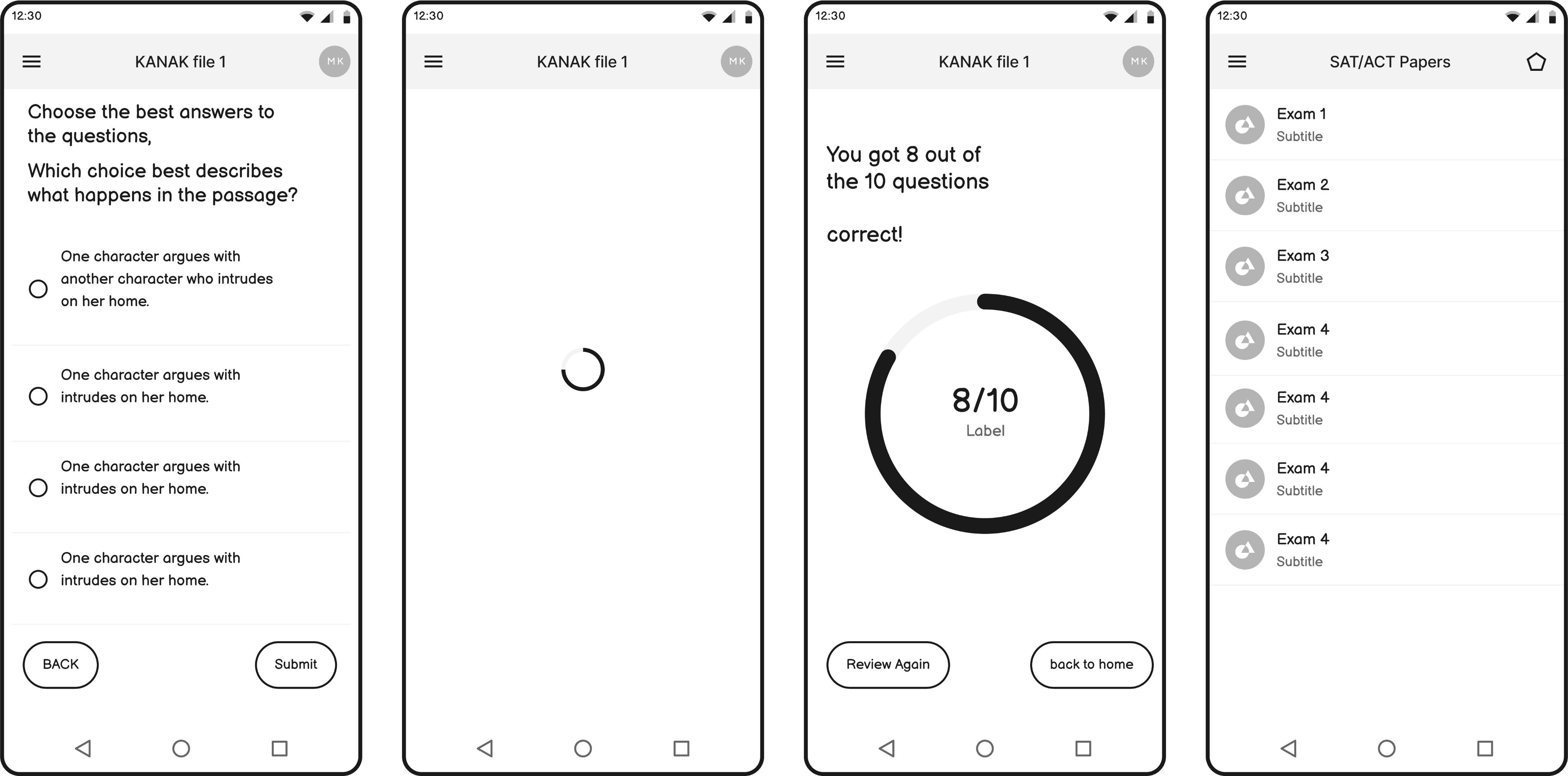
High-fidelity Wireframes
Visual and Interaction Design
Design System
Design System
Typography & Colours
Typography & Colours
Primary Font
Primary Font



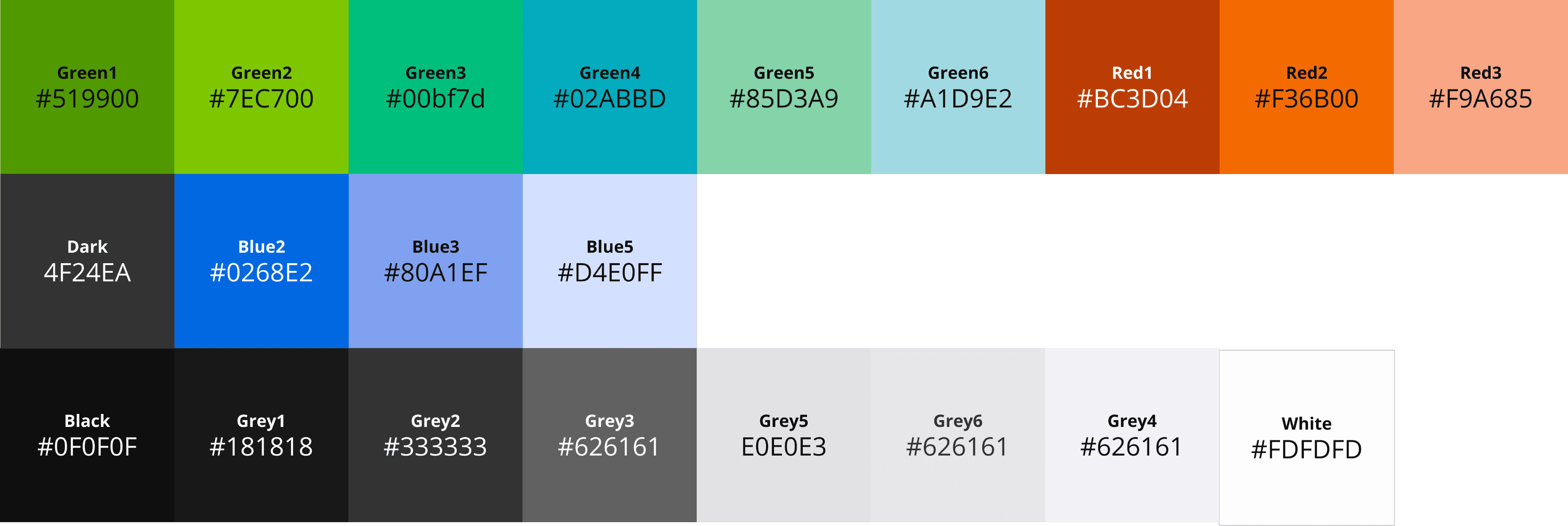
Color Palette
Color Palette
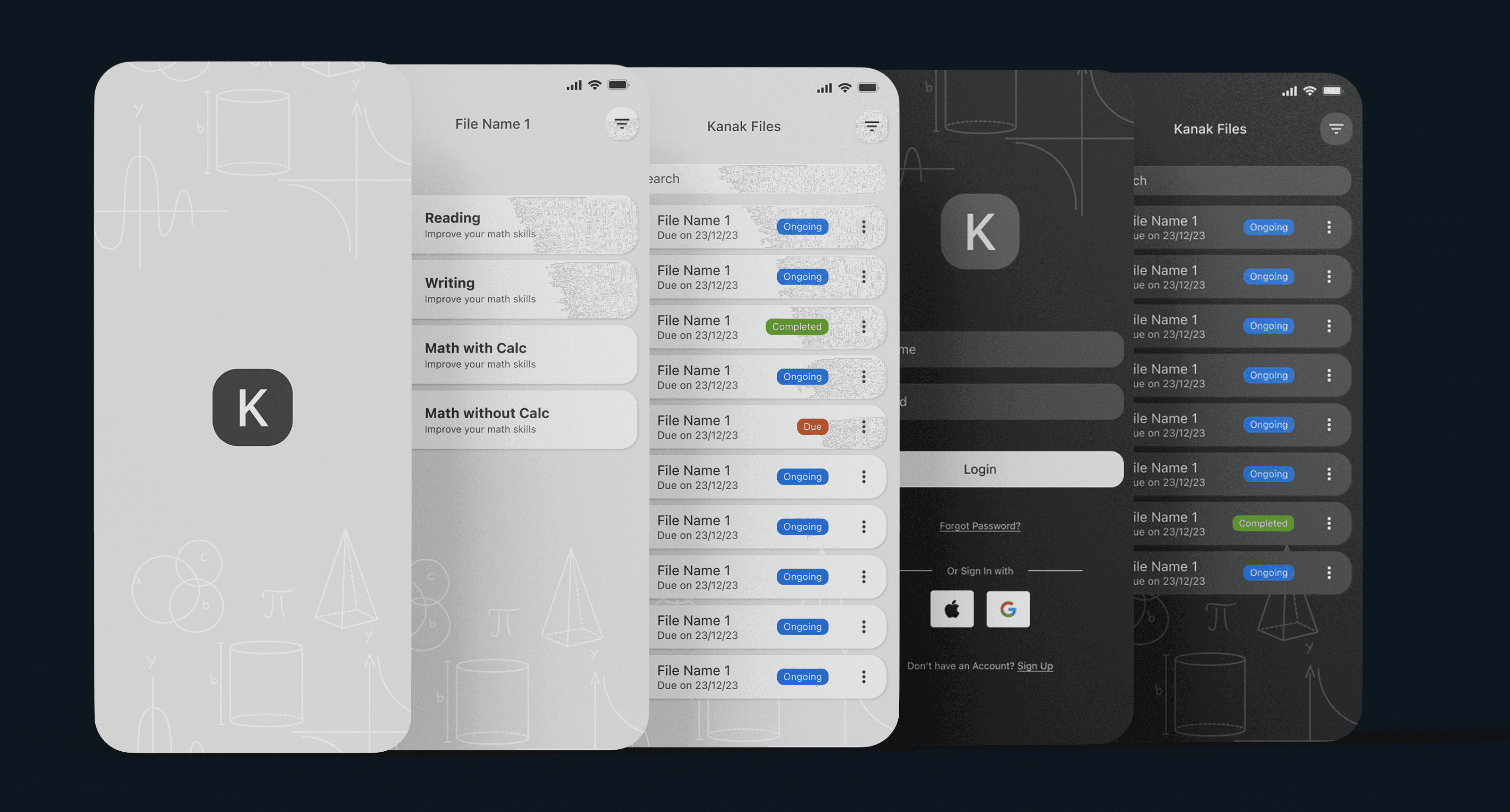
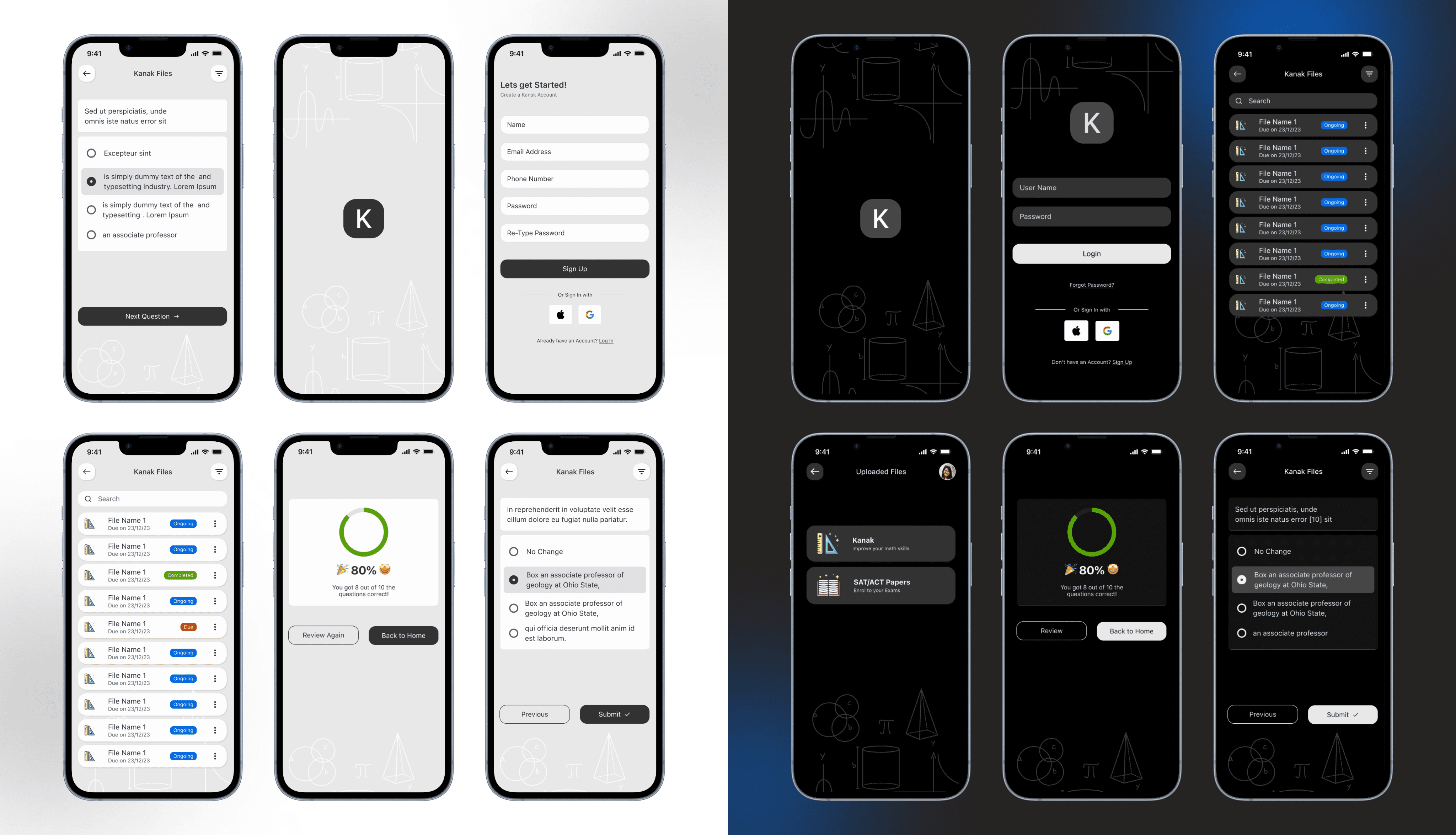
High-Fidelity Screens
High-Fidelity Screens
Prototyping and Testing
Prototyping and Testing
Interactive Prototypes
Interactive Prototypes


Usability Testing & Iteration
Tested with 6 visually impaired students + 2 teachers using iPhone and iPad
Tested with 6 visually impaired students + 2 teachers using iPhone and iPad
Key feedback:
Key feedback:
Landscape mode improved accuracy in graph-based questions
Users loved the vibration feedback ("I knew I tapped it right!")
Font adjustment helped both low vision and dyslexic users
Enhance the home page to feel more complete.
Immediate verbal score feedback was motivating and empowering
Landscape mode improved accuracy in graph-based questions
Users loved the vibration feedback ("I knew I tapped it right!")
Font adjustment helped both low vision and dyslexic users
Enhance the home page to feel more complete.
Immediate verbal score feedback was motivating and empowering
Final Implementation
Final Implementation
Delivering a smooth and inclusive product experience.
Delivering a smooth and inclusive product experience.
Final Outcome & Metrics
Final Outcome & Metrics
92% of students could complete SAT-style tasks without visual help
84% said this was more engaging than any app they had used before
Teachers saw students complete assignments independently
Kanak was praised for being both inclusive and motivating
92% of students could complete SAT-style tasks without visual help
84% said this was more engaging than any app they had used before
Teachers saw students complete assignments independently
Kanak was praised for being both inclusive and motivating
Before & After Comparison
Before & After Comparison

Challenges & Solutions
Challenge 1:
Problem: Supporting graph drawing for non-visual users

Solution: Used landscape mode + touch/audio overlays on iPad
Challenge 2:
Problem: Making content accessible without screen reader overload
Solution: Added haptic cues and sound feedback at key points
Challenge 3:
Problem: Designing for different vision levels
Solution: Included font customization, zoom, and contrast options
Challenge 4:
Problem: Enabling SAT prep without visuals
Solution: Built audio-timed simulations and section selectors
Challenge 5:
Problem: Ensuring intuitive file access
Solution: Developed categorized file system with teacher-shared folders
Next Steps
Pilot in vision-focused schools
Expand subject support (Reading, Science)
Add Braille display integration
Localize app for global reach
Conclusion
Kanak is more than a learning tool - it’s a shift in how accessible education should feel. Built natively for iOS, with tactile, audio-first interactions and full SAT prep support, Kanak helps visually impaired students learn, practice, and succeed independently - with confidence in every tap, swipe, and spoken word.
Challenges & Solutions
Challenges & Solutions
Challenge 1:
Challenge 1:
Problem: Supporting graph drawing for non-visual users
Problem: Supporting graph drawing for non-visual users
Solution: Used landscape mode + touch/audio overlays on iPad
Solution: Used landscape mode + touch/audio overlays on iPad
Challenge 2:
Challenge 2:
Problem: Making content accessible without screen reader overload
Problem: Making content accessible without screen reader overload
Solution: Added haptic cues and sound feedback at key points
Solution: Added haptic cues and sound feedback at key points
Challenge 3:
Challenge 3:
Problem: Designing for different vision levels
Problem: Designing for different vision levels
Solution: Included font customization, zoom, and contrast options
Solution: Included font customization, zoom, and contrast options
Challenge 4:
Challenge 4:
Problem: Enabling SAT prep without visuals
Problem: Enabling SAT prep without visuals
Solution: Built audio-timed simulations and section selectors
Solution: Built audio-timed simulations and section selectors
Challenge 5:
Challenge 5:
Problem: Ensuring intuitive file access
Problem: Ensuring intuitive file access
Solution: Developed categorized file system with teacher-shared folders
Solution: Developed categorized file system with teacher-shared folders
Next Steps
Next Steps
Pilot in vision-focused schools
Pilot in vision-focused schools
Expand subject support (Reading, Science)
Expand subject support (Reading, Science)
Add Braille display integration
Add Braille display integration
Localize app for global reach
Localize app for global reach
Conclusion
Conclusion
Kanak is more than a learning tool - it’s a shift in how accessible education should feel. Built natively for iOS, with tactile, audio-first interactions and full SAT prep support, Kanak helps visually impaired students learn, practice, and succeed independently - with confidence in every tap, swipe, and spoken word.
Kanak is more than a learning tool - it’s a shift in how accessible education should feel. Built natively for iOS, with tactile, audio-first interactions and full SAT prep support, Kanak helps visually impaired students learn, practice, and succeed independently - with confidence in every tap, swipe, and spoken word.


I love working with teams who care about great design and smart solutions.
Got something in mind?
Tamara Hansani © 2025
I love working with teams who care about great design and smart solutions.
Got something in mind?
Tamara Hansani © 2025
